

.png)


1. Introduction
Language learning apps are evolving rapidly in 2026. Users no longer want lengthy lessons—they want short, engaging experiences that build lasting habits. That's why apps like Duolingo have been so successful: they make learning simple, rewarding, and easy to return to every day.
The good news is that building these experiences is now more accessible than ever. With FlutterFlow, developers and startups can create powerful language learning apps without complex coding or long development cycles. In this guide, we'll explore the features that make these apps successful and how you can build your own using a modern FlutterFlow approach.
2. What Makes a Duolingo Like App Work So Well?
Most people assume it’s the content. It’s not. Plenty of apps teach languages, but very few keep users coming back daily.
The real difference? Structure and behavior design.
A Duolingo like app is built around momentum. Users aren’t asked to “learn a language.” They’re asked to complete one tiny task. That’s it. One lesson, one quiz, one streak saved.
And suddenly, they’re hooked.
Why users stick:
- Gamification in apps keeps things light and rewarding
- A visible streak system creates urgency (“don’t break it today”)
- Lessons are short, usually under 5 minutes
- Instant feedback makes progress feel real
But the biggest win is simplicity. No clutter. No overwhelm. Just a clear next step.
When you build language learning app experiences like this, you’re not designing for knowledge, you’re designing for consistency. That’s a different mindset.
Even in a FlutterFlow language learning app, this principle holds. The UI should guide users, not confuse them. Buttons should feel obvious. Progress should feel earned.
And one more thing, Duolingo’s UX isn’t fancy. It’s predictable. That’s intentional. Users don’t want to think about navigation; they want to keep moving.
If you get this part right, the rest becomes much easier.
3. Core Features You Need in a FlutterFlow Language Learning App
Before jumping into building, get the foundation right. Most apps fail here, they either add too much or miss what actually matters.
A solid FlutterFlow language learning app isn’t feature-heavy. It’s feature-focused.
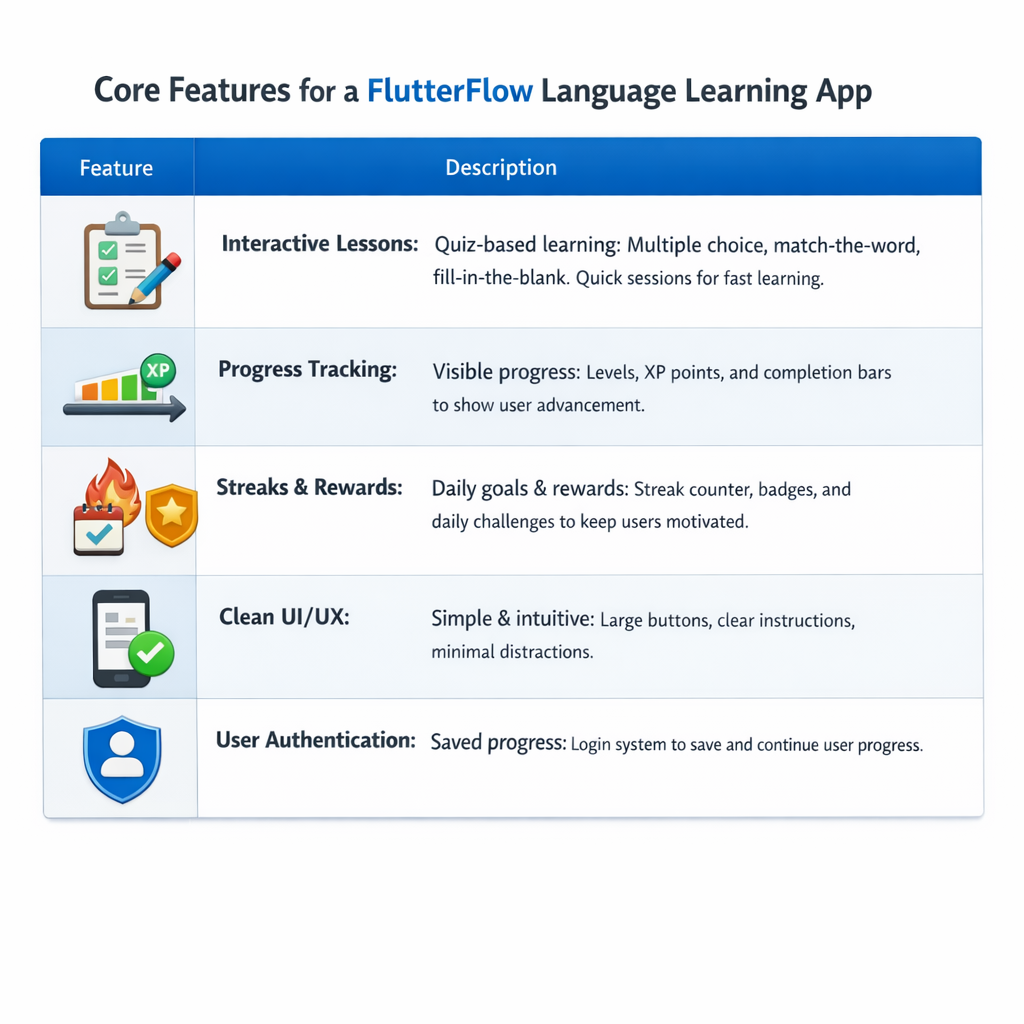
Interactive lessons (quiz-based learning)
This is your core. Think multiple-choice, match-the-word, fill-in-the-blank. Keep it fast. Users should complete a lesson in minutes, not sit through long explanations.
Progress tracking that feels visible
People stay when they see progress. Levels, XP points, completion bars, small indicators make a big difference. Without this, users lose direction quickly.
Streaks and rewards
A simple streak system can outperform complex features. Add daily goals, badges, or small rewards. It taps into habit-building without forcing it.
Clean UI/UX for learning apps
Don’t overdesign. Large buttons, clear instructions, minimal distractions. If users have to think about what to tap next, something’s wrong.
User authentication and saved progress
Basic but essential. Let users pick up where they left off. This becomes critical as your app grows.
When you build language learning app products using FlutterFlow app development, these features are enough to launch a strong MVP. You can always expand later, but skipping these will hurt retention from day one.
4. How to Build a Duolingo Like App in FlutterFlow (Step-by-Step)
Let’s not overcomplicate this. You’re not building Duolingo overnight, you’re building a working version that people can actually use.
Start simple.
First, open FlutterFlow and sketch the basic screens. Home, lesson, result. That’s enough. You don’t need 10 screens on day one. Most beginners make that mistake and get stuck before anything works.
Now think about flow. A good Duolingo like app doesn’t leave users wondering what to do next. You open the app, you tap a lesson, you complete it, and you move forward. That loop is everything.
Next comes the content structure. Don’t dump everything into one place. Break lessons into levels. Small chunks. A user should finish one lesson while waiting for coffee, not sit there for 20 minutes.
Then wire up the logic. When a user answers correctly, they move ahead. If not, they retry. Add points, unlock the next level, keep it tight. This is where your app starts feeling real.
For data, connect Firebase. You’ll need it to store progress, streaks, and user activity. Without that, your FlutterFlow language learning app feels static, and people drop off fast.
And testing? Don’t treat it like a formality. Use your own app for a day or two. You’ll notice things you didn’t expect, buttons that feel off, flows that break, tiny annoyances. Fix those early.
If you follow this kind of approach, you can build language learning app MVPs through practical FlutterFlow app development, not theory, and that’s what actually gets apps launched.
5. Can FlutterFlow Handle a Production-Ready Language App in 2026?
It can, but only if you don’t try to overbuild everything on day one.
For a typical FlutterFlow language learning app, things are pretty straightforward. You’ve got lessons, user progress, maybe a streak system. That kind of structure fits well with FlutterFlow app development.
Once you plug in Firebase, most of the heavy lifting, auth, data, syncing, just works. No complicated setup, no backend headaches early on.
Where people run into trouble is when they try to get too fancy. Complex logic, too many edge cases, or trying to replicate every Duolingo feature right away. That slows everything down.
For an MVP though? It’s solid. Fast to build, easy to test, and you can actually ship.
So if the goal is to build language learning app experiences and get real users, FlutterFlow holds up better than most people expect.
6. How Long Does It Take to Build a Language Learning App?
Faster than most people expect.
If you keep things lean, an MVP can be ready in about 1–2 weeks. That means core lessons, basic progress tracking, and a working flow. Nothing fancy, but usable.
A more complete version? Usually 3–5 weeks. That’s where you refine UI, add better lesson structures, maybe improve engagement features.
With FlutterFlow app development, the timeline mostly depends on how quickly you make decisions. Not the tech.
Try to do everything at once, and it drags. Focus on one clear version, and you move fast.
That’s the real advantage when you build language learning app products this way.
7. Common Mistakes People Make
This is where most apps quietly fail.
Overbuilding is the big one. Too many features, too early. Instead of improving the experience, it slows everything down.
Another issue, complicated lessons. If a user has to think too much, they drop off. Simple always wins here.
And then there’s engagement. No streaks, no rewards, no reason to return. Even a basic Duolingo like app gets this part right.
Keep it simple, keep it moving, and focus on daily use, not perfection.
8. How Language Learning Apps Make Money
Most follow a simple model.
Free to start, paid to go deeper.
Subscriptions work best, unlock advanced lessons, remove limits, or add premium features. Ads can work too, but overdo it and users leave.
Some apps also sell structured courses or one-time upgrades.
If you’re planning to build language learning app products seriously, monetization should feel like an upgrade, not a barrier.
9. Conclusion
You don’t need a huge team to build something like this anymore.
With the right approach, a FlutterFlow language learning app can go from idea to real product in weeks. What matters isn’t complexity, it’s clarity. Clear lessons, clear flow, and a reason for users to come back.
That’s what makes these apps work.
%20(1).jpg)

.png)
_b_change__2025__to__20.jpg)
.png)

.png)
.png)
.png)
.png)
Ready to develop your own product? Get in touch today!
Get in Touch