



Introduction
If you've exported a FlutterFlow project and expected a clean Flutter codebase, you probably had the same reaction most developers do after opening the lib folder for the first time.
"This is... more generated code than I expected."
Nothing is technically wrong with it. The app runs. The structure makes sense from FlutterFlow's perspective. But once you start adding features manually, introducing Riverpod, reorganizing business logic, or bringing more developers into the project, you quickly realize that exporting code and owning the codebase are two different things.
That's really what this guide is about.
A FlutterFlow to Flutter migration isn't converting one language into another—FlutterFlow already generates Flutter. The real work is turning a generated project into something engineers can comfortably maintain over the next few years. Sometimes that's a light cleanup. Sometimes it's a complete architectural refactor.
We'll go through that process step by step, including what should stay, what should go, and the engineering decisions that usually have the biggest impact on both development speed and FlutterFlow migration cost.

What Is FlutterFlow to Flutter Migration and Why Do Teams Do It?
What Does "Migrating from FlutterFlow to Flutter" Actually Mean?
Ask ten developers what FlutterFlow to Flutter migration means, and you'll probably hear ten slightly different answers. Some think it's exporting the source code. Others assume it's rewriting the app from scratch. Neither is entirely correct.
Here's what's actually happening.
FlutterFlow already builds your application using Flutter. When you click Export Code, you don't receive a different technology stack—you receive a Flutter project generated according to FlutterFlow's own architecture and conventions. The app compiles, runs, and can be opened in Android Studio or VS Code just like any other Flutter project.
So where does the migration begin?
It begins when your team decides that the generated project is no longer the project they want to maintain.
A typical FlutterFlow to Flutter migration is about taking ownership of that codebase. Instead of depending on generated state management, generated helper classes, and platform-specific abstractions, developers gradually replace them with patterns that fit their own engineering standards. That may include introducing Riverpod or Bloc, reorganizing the folder structure, extracting business logic into services, or rebuilding the data layer around repositories.
That's why teams migrate a FlutterFlow app to Flutter even though both use the same framework underneath. The destination isn't a different language—it's a codebase that's easier to evolve without relying on code generation.
Is FlutterFlow Only Good for Simple Apps?
Not really. That idea comes from the early days of visual app builders, and FlutterFlow has moved well beyond that stage.
Today, production FlutterFlow applications can integrate Firebase, Supabase, REST APIs, GraphQL services, Stripe, Razorpay, Google Maps, custom packages, platform channels, native Swift and Kotlin code, and fully custom widgets. If a feature isn't available through the visual builder, developers can usually extend it with Custom Actions, Custom Functions, or native code.
That's why saying FlutterFlow is "only for MVPs" isn't accurate anymore.
In fact, many teams never need a FlutterFlow to Flutter migration. Their products continue to grow while remaining inside FlutterFlow because the platform still meets both their technical and business requirements.
The important distinction isn't simple app versus complex app. It's generated architecture versus manually maintained architecture.
A complex application can absolutely stay in FlutterFlow. Likewise, a relatively small application might still migrate a FlutterFlow app to Flutter if the engineering team wants complete control over project structure, development workflows, or release management.
If FlutterFlow Can Handle Complex Apps, Why Do Teams Still Migrate to Pure Flutter?
This question comes up a lot, especially from founders.
"If FlutterFlow already exports Flutter code, why spend time migrating?"
Because software changes. Teams change. Products change.
An MVP built by one developer often becomes a product maintained by six or seven engineers. Features that once lived inside a handful of pages now spread across authentication, payments, analytics, notifications, subscriptions, AI integrations, and multiple backend services. At that point, architecture starts influencing development speed more than the visual builder itself.
That's where a FlutterFlow to Flutter migration becomes a technical decision rather than a feature decision.
Developers may want stricter code ownership, dependency injection, domain-driven architecture, feature modules, automated testing, or custom build pipelines. None of these are impossible inside FlutterFlow, but implementing and maintaining them directly in a conventional Flutter project often gives engineering teams greater flexibility.
Notice what isn't on that list: "FlutterFlow can't build the feature."
Most migration projects happen because teams want to change how they build software, not what they can build.
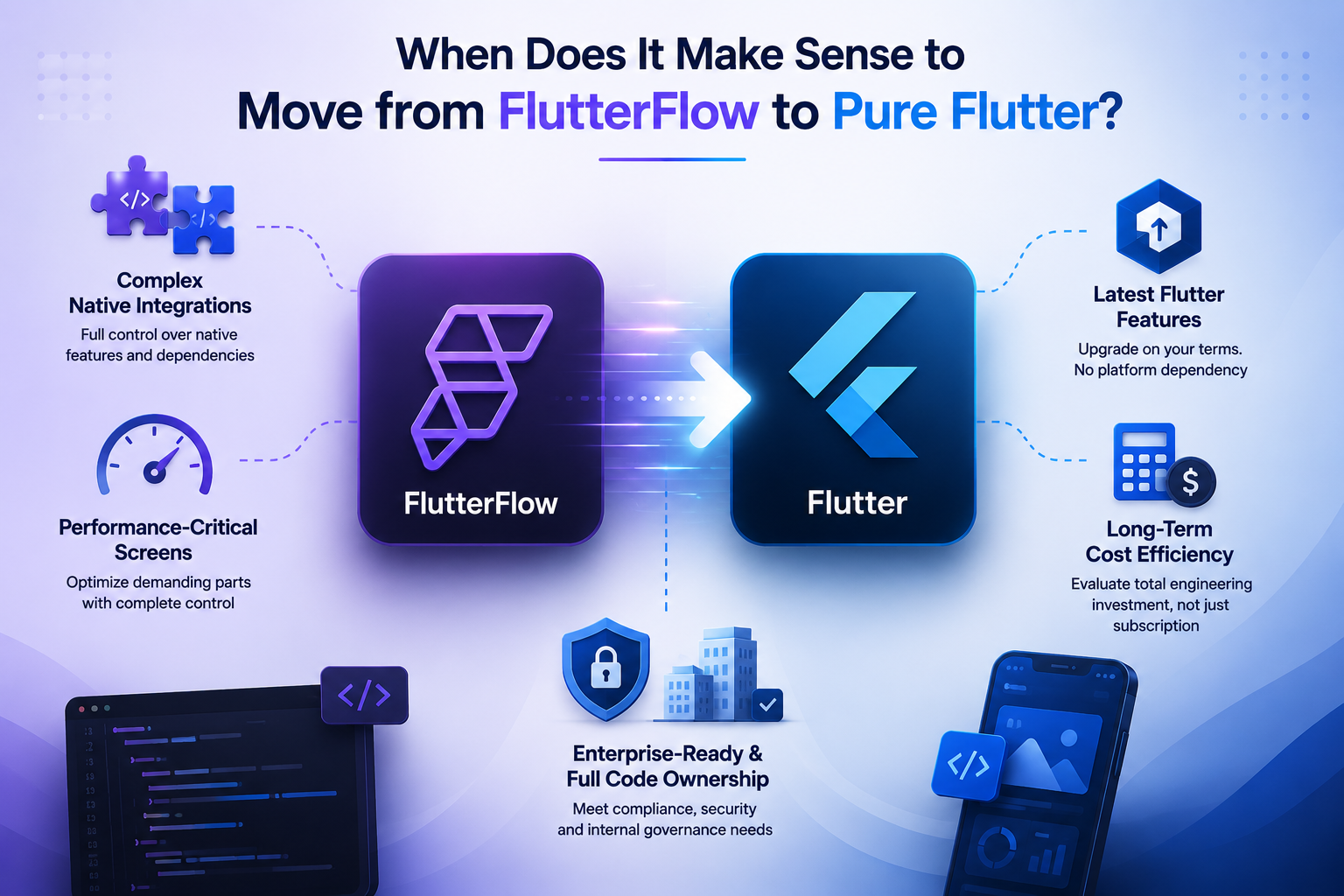
When Does It Make Sense to Move from FlutterFlow to Pure Flutter?
Not every successful FlutterFlow project needs to move to pure Flutter. That's probably the biggest misconception around FlutterFlow to Flutter migration. Many production apps continue to scale successfully inside FlutterFlow, while others decide to migrate a FlutterFlow app to Flutter much earlier. The difference usually isn't the number of users or screens—it's how the engineering requirements evolve over time.
At What Point Does Managing Native Integrations Become Easier in Pure Flutter?
FlutterFlow already supports custom widgets, Custom Actions, native code, and third-party packages, so integrating services like Firebase, Stripe, Google Maps, or OneSignal isn't unusual.
The challenge appears when native functionality becomes a major part of the application. Apps that rely heavily on Bluetooth, NFC, HealthKit, custom Android services, or proprietary SDKs often require continuous native development. At that stage, many teams prefer a standard Flutter project where they control every dependency, platform configuration, and build process. That's often the point where a FlutterFlow to Flutter migration becomes a practical engineering decision.
Why Do Large-Scale Apps Sometimes Move Performance-Critical Screens to Hand-Written Flutter?
A common myth is that migrating automatically makes an app faster. It doesn't.
FlutterFlow already generates Flutter code, so performance depends far more on widget rebuilding, state management, API efficiency, and rendering than on the tool itself.
However, teams building real-time dashboards, interactive maps, trading platforms, or media-heavy applications sometimes choose to migrate a FlutterFlow app to Flutter because they want complete control over how these complex screens are optimized. Instead of replacing the entire application, many organizations migrate only the parts that benefit from manual optimization.
How Does FlutterFlow's Flutter SDK Update Cycle Affect Teams Needing the Latest Features?
FlutterFlow regularly updates its supported Flutter version, but those updates naturally follow testing and validation.
For most projects, that delay isn't important. But teams that adopt the latest Flutter SDK, experimental packages, or recently released framework features often prefer upgrading on their own schedule. A FlutterFlow to Flutter migration removes that dependency and lets developers decide when to update their toolchain.
When Does a FlutterFlow Subscription Cost More Than Maintaining an In-House Dev Team?
This question isn't really about subscription pricing—it's about engineering economics.
As companies grow, they often invest in dedicated Flutter developers, DevOps pipelines, automated testing, and internal development standards. At that point, the overall FlutterFlow migration cost should be compared against long-term engineering efficiency rather than subscription fees alone.
A successful FlutterFlow to Flutter migration involves architecture planning, code refactoring, QA, and deployment, so the migration investment should always be evaluated over several years instead of focusing only on immediate costs.
Why Do Some Enterprise Clients Prefer Full Code Ownership Outside a Platform?
Enterprise organizations usually have stricter engineering and compliance requirements than startups. Security reviews, internal package policies, release approvals, and long-term maintenance plans often require complete ownership of the application's source code and development workflow.
That's why some enterprises decide to migrate a FlutterFlow app to Flutter. The goal isn't to replace FlutterFlow's capabilities—it's to manage the project entirely within their own engineering processes. For these organizations, a FlutterFlow to Flutter migration is often driven by governance and maintainability rather than technical limitations.
Should You Fully Migrate or Just Export and Continue in Code?
One of the biggest mistakes teams make is assuming that exporting code means they have to leave FlutterFlow forever. They don't.
In reality, there are three different paths after exporting your project. Some teams continue using FlutterFlow while making occasional code changes. Others gradually reduce their dependency on FlutterFlow. A few decide to perform a complete FlutterFlow to Flutter migration and maintain everything directly in Flutter.
Choosing the right path depends on your product roadmap, team size, and how much control you want over the codebase.
What's the Difference Between "Ejecting" and "Full Migration"?
People often use these terms interchangeably, but they're not the same.
Exporting—or "ejecting"—simply gives you the generated Flutter source code. The project still contains FlutterFlow-specific utilities, generated state management, themes, and supporting classes. You can edit the code, but the project still reflects FlutterFlow's architecture.
A FlutterFlow to Flutter migration goes several steps further. Developers gradually replace generated patterns with their own architecture, remove unnecessary dependencies, restructure folders, and make the application independent of FlutterFlow's code generation.
Think of exporting as receiving the keys to the house. Migration is renovating it to suit your own needs.
Can You Migrate Only Part of a FlutterFlow App?
Yes—and many experienced teams do exactly that.
A complete rewrite isn't always necessary. You can leave stable modules untouched while rebuilding only the areas that benefit from manual development. Performance-heavy screens, complex business logic, or custom integrations are usually the first candidates.
This phased approach reduces risk, allows continuous feature development, and gives developers time to validate architectural decisions before committing to a full FlutterFlow to Flutter migration.
For many companies, it's the most practical way to migrate a FlutterFlow app to Flutter without disrupting ongoing releases.
How Do You Decide If Full Migration Is Worth It?
There's no universal rule, but asking a few practical questions usually makes the decision clearer.
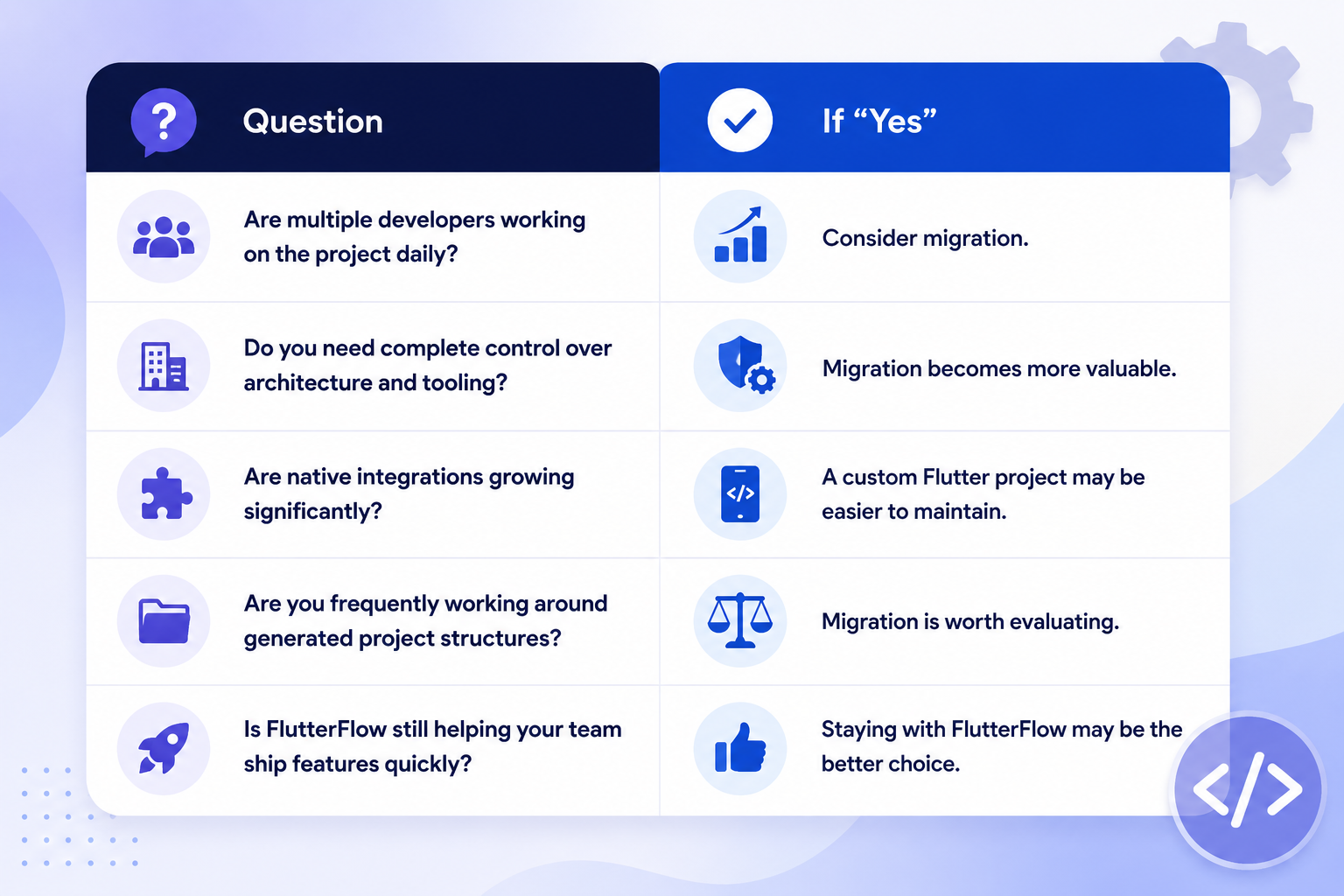
If most answers point toward engineering flexibility rather than rapid visual development, a FlutterFlow to Flutter migration is probably justified.
If not, exporting the project and continuing development with FlutterFlow may deliver better results with less effort. The goal isn't to migrate a FlutterFlow app to Flutter because everyone else is doing it. The goal is to choose the workflow that helps your team build and maintain software more efficiently.
How Does FlutterFlow's Generated Code Actually Work?
Open an exported FlutterFlow project for the first time and you'll probably spend the first few minutes just exploring folders. That's normal. The project is much larger than most developers expect.
A common misconception is that FlutterFlow only generates UI. It doesn't. It generates an entire Flutter application—including routing, themes, state management, backend helpers, animations, reusable components, and configuration files. Before you begin a FlutterFlow to Flutter migration, it's worth understanding what each part is responsible for. Otherwise, it's surprisingly easy to refactor something that wasn't actually causing a problem.
What Does a FlutterFlow-Exported Project's Folder Structure Look Like?
Although the exact structure changes as FlutterFlow evolves, most exported projects follow a familiar layout.
lib/
├── backend/
├── flutter_flow/
├── pages/
├── components/
├── custom_code/
├── app_state.dart
├── custom_functions.dart
└── main.dart
Most folders are named exactly how you'd expect. Screens live inside pages, reusable widgets inside components, while backend-related code is grouped under backend.
The folder that usually raises questions is flutter_flow.
It contains many of the utilities FlutterFlow generates automatically—theme helpers, animations, navigation utilities, serialization helpers, and other files that keep the generated project consistent. They're not random files, and deleting them simply because they "look generated" is rarely a good idea during a FlutterFlow to Flutter migration.
What Is FFAppState and How Does State Management Work in FlutterFlow?
If you've built an app in FlutterFlow, you've probably used FFAppState without thinking much about it.
It's essentially a shared application state. Instead of passing data through multiple widgets, FlutterFlow lets you store values centrally and access them wherever they're needed. For many applications, that's perfectly adequate.
Things become more interesting as the project grows.
Large engineering teams often prefer solutions like Riverpod or Bloc because they provide clearer separation between presentation, business logic, and data. That's one reason companies migrate a FlutterFlow app to Flutter. The goal isn't to remove FFAppState because it's "wrong." It's to adopt a state management approach that better matches the team's architecture.
How Do Custom Actions and Custom Functions Work Under the Hood?
This is where FlutterFlow becomes much more flexible than many developers expect.
Custom Functions are simply reusable Dart methods. They perform calculations or transform data without depending on Flutter widgets or external services.
Custom Actions are different. They execute Dart code that can call APIs, interact with plugins, read device information, or perform asynchronous operations. When the project is exported, these aren't hidden behind FlutterFlow anymore—they're ordinary Dart files that become part of your codebase.
During a FlutterFlow to Flutter migration, teams usually keep this logic but move it into dedicated service classes or repositories. The functionality stays the same; only the organization changes.
How Does FlutterFlow Handle Navigation (go_router)?
FlutterFlow builds its navigation on top of go_router, which is already a widely adopted package in the Flutter ecosystem.
Routes, page parameters, redirects, and authentication checks are generated automatically. That's why exported projects already have a working navigation system instead of dozens of manually configured routes.
Because go_router isn't unique to FlutterFlow, many teams leave it exactly as it is after they migrate a FlutterFlow app to Flutter. Unless there's a strong architectural reason to switch, keeping the existing routing setup is usually the simpler option.
How Does FlutterFlow's Theme System (FlutterFlowTheme.of(context)) Work?
Rather than exposing Flutter's ThemeData directly, FlutterFlow wraps styling inside its own theme class.
The idea is straightforward: every generated widget pulls colors, fonts, spacing, and typography from a single source. Change the design inside FlutterFlow, regenerate the project, and those updates flow throughout the application automatically.
After a FlutterFlow to Flutter migration, teams often keep this theme temporarily. Later, once the application architecture has stabilized, they gradually replace it with their own design system or standard Flutter theming. Trying to rewrite the entire styling layer on day one usually creates more work than value.
How Does FlutterFlow Generate Backend Queries for Supabase and Firebase?
Connecting Firestore or Supabase inside FlutterFlow doesn't just configure the database—it also generates the code that talks to it.
Queries, authentication helpers, document models, and CRUD operations are created automatically, allowing developers to focus on application logic instead of repetitive boilerplate.
One thing worth mentioning is that these generated queries are perfectly usable after export. A FlutterFlow to Flutter migration doesn't require rebuilding every database interaction from scratch. Many teams continue using the generated backend layer initially and only refactor it later when introducing repositories, dependency injection, or a different application architecture.
That staged approach usually keeps the migration smaller, safer, and much easier to review.
What Should You Do Before Migrating FlutterFlow to Flutter?
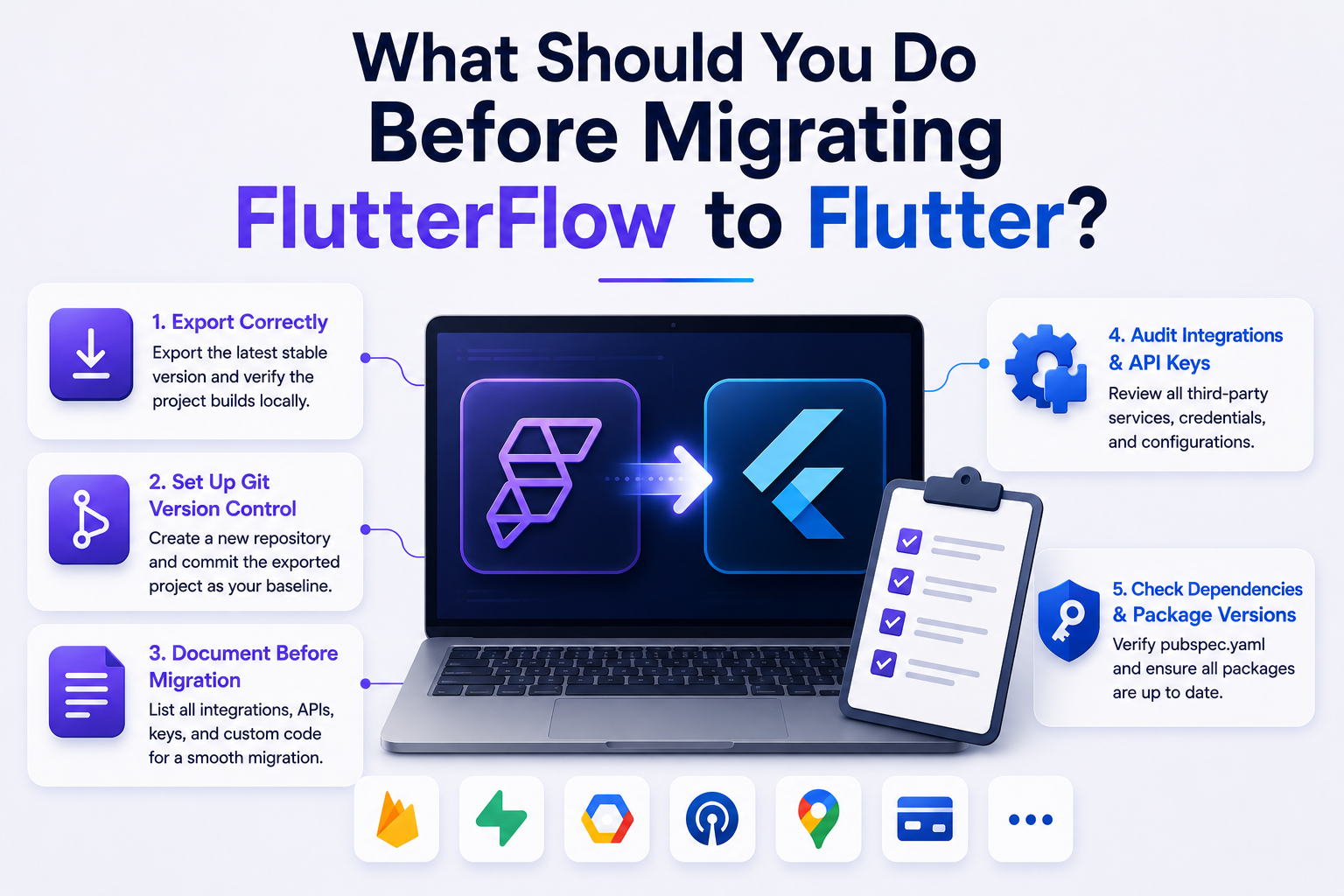
A successful FlutterFlow to Flutter migration usually starts long before anyone opens VS Code. Most migration problems aren't caused by Flutter—they're caused by missing documentation, forgotten API keys, or changing project architecture halfway through the process.
Spending a few hours preparing the project can save days of debugging later.
How Do You Export a FlutterFlow Project Correctly?
Before you migrate a FlutterFlow app to Flutter, export the latest stable version of your project instead of a work-in-progress build. Resolve pending UI changes, remove unused pages, and verify that the application runs correctly inside FlutterFlow.
Once the export is complete, build the project locally without making any modifications. If the generated code already compiles successfully, you'll know that any future issues are introduced during the migration—not during the export.
Treat this exported project as your baseline.
How Do You Set Up Git Version Control for a FlutterFlow Export?
One mistake teams make is starting the migration without creating a clean Git history.
Create a new repository—or a dedicated migration branch—and commit the exported project immediately. This gives you a reliable rollback point if a refactoring introduces unexpected issues.
As the FlutterFlow to Flutter migration progresses, make small, focused commits instead of rewriting the entire project in one go. It's much easier to review changes when navigation, state management, and backend refactoring happen independently.
What Should You Document Before Migration Starts?
Migration becomes much smoother when the existing application is documented.
Create a simple checklist covering:
- Authentication providers
- API endpoints
- Environment variables
- Push notification setup
- Third-party packages
- Payment gateways
- Deep links
- Custom Actions and Custom Widgets
When teams migrate a FlutterFlow app to Flutter, these integrations are usually where hidden dependencies appear. A short document created upfront can prevent hours of investigation later.
How Do You Audit Third-Party Integrations and API Keys?
Before writing new architecture, review everything your application depends on.
Check Firebase configuration, Supabase credentials, Google services files, Apple certificates, OneSignal keys, Maps APIs, payment gateways, analytics tools, and any custom SDKs. Also verify package versions inside pubspec.yaml, since some dependencies may need updates after export.
This final review helps ensure your FlutterFlow to Flutter migration starts with a stable foundation rather than uncovering missing configurations halfway through development.
How Do You Migrate a FlutterFlow App to Flutter Step by Step?
There's no single "Migrate" button that transforms a FlutterFlow project into a perfectly structured Flutter application.
A successful FlutterFlow to Flutter migration happens in phases. The idea isn't to rewrite everything immediately—it's to improve the architecture while keeping the application functional throughout the process.
Step 1: How Do You Set Up Your Local Flutter Development Environment?
Start by opening the exported project in your preferred IDE and make sure it builds successfully before changing anything.
Run:
flutter pub get
flutter run
If the application doesn't compile at this stage, fix those issues first. Never begin a FlutterFlow to Flutter migration on a project that already has unresolved build errors.
Step 2: How Do You Clean Up FlutterFlow's Generated Boilerplate?
Don't start deleting generated files immediately.
Instead, identify which folders your team plans to own going forward. Most developers keep the generated code initially and refactor it gradually rather than attempting a full rewrite.
A good first step is removing unused pages, components, assets, and dependencies that are no longer required. Small cleanups reduce complexity without introducing unnecessary risk.
Step 3: How Do You Replace FFAppState with Provider, Riverpod, or Bloc?
This is usually one of the biggest milestones.
Instead of replacing every state object at once, migrate feature by feature. For example, move authentication first, then user profiles, then settings, and so on.
This incremental approach allows teams to migrate a FlutterFlow app to Flutter without breaking unrelated parts of the application and makes debugging significantly easier.
Step 4: How Do You Refactor Custom Actions into Clean Service Classes?
Custom Actions often contain valuable business logic.
Rather than keeping API calls, payment logic, or notification handling inside generated files, extract them into dedicated service classes. This separates business logic from UI code and makes future testing much simpler.
During most FlutterFlow to Flutter migration projects, this refactoring has a much bigger impact on maintainability than redesigning the interface.
Step 5: Should You Keep go_router or Switch Navigation Systems?
In most cases, keep it.
FlutterFlow already generates navigation using go_router, which is widely used across Flutter projects. Unless your application has a specific routing requirement, replacing it adds work without delivering much value.
Focus your migration effort where it actually improves the project.
Step 6: How Do You Convert FlutterFlow's Theme System into Design Tokens?
Your application's colors and typography shouldn't be scattered across widgets.
Many teams gradually replace FlutterFlowTheme with Flutter's ThemeData or an internal design system. The migration doesn't have to happen all at once. You can support both approaches temporarily while new screens follow the updated design structure.
Step 7: How Do You Restructure Supabase or Firebase Calls into a Repository Pattern?
Generated backend queries work well, but as the application grows, keeping database logic inside UI files becomes difficult to maintain.
A common approach is introducing repository classes that handle data access separately from widgets. The UI requests data, the repository communicates with Firebase or Supabase, and the rest of the application remains unaware of how the data is retrieved.
This is one of the biggest architectural improvements teams make when they migrate a FlutterFlow app to Flutter.
Step 8: How Do You Rebuild CI/CD After Leaving FlutterFlow?
Finally, automate your release process.
Set up GitHub Actions, Codemagic, or another CI/CD platform to handle builds, testing, code analysis, and deployments. Automating these tasks reduces manual errors and keeps releases consistent as the engineering team grows.
By this point, your FlutterFlow to Flutter migration is no longer just a code refactor—it's a transition to a fully managed Flutter engineering workflow.

What Should You Expect When Cleaning Up FlutterFlow's Generated Code?
The first few days of a FlutterFlow to Flutter migration are usually not spent building new features. They're spent understanding the code that's already there.
That's completely normal.
FlutterFlow generates code for a visual development environment. A Flutter developer, on the other hand, usually organizes a project around maintainability, testing, and long-term ownership. Those goals overlap, but they're not identical. The cleanup phase is simply the process of aligning the exported project with the way your engineering team prefers to work.
Why Is FlutterFlow's Widget Tree Structured the Way It Is, and How Do You Refactor It?
Developers are sometimes surprised by the number of nested widgets inside an exported screen.
There's a reason for that.
FlutterFlow builds interfaces visually. Every alignment, padding adjustment, conditional visibility rule, or responsive setting has to be represented in generated Flutter code. The result is often a deeper widget tree than someone would write by hand.
That doesn't automatically mean the code is inefficient.
During a FlutterFlow to Flutter migration, resist the temptation to rewrite every screen immediately. Start by identifying repeated UI patterns. Extract common cards, buttons, dialogs, and headers into reusable widgets. Once those pieces are isolated, the remaining screen becomes much easier to understand.
What Hidden FlutterFlow Package Dependencies Should You Watch For?
A common mistake is opening pubspec.yaml and deleting every package that looks unfamiliar.
Don't.
Several generated utilities depend on packages that aren't referenced directly inside your page widgets. Removing them too early can lead to missing imports or runtime issues that aren't obvious from the error message.
A better approach is simple:
- Remove one dependency.
- Run flutter pub get.
- Build the project.
- Run a quick smoke test.
Repeat.
It's slower, but it's also much safer when you migrate a FlutterFlow app to Flutter.
How Do You Reconfigure Push Notifications (OneSignal) Post-Migration?
If notifications worked before the migration, don't assume they'll work afterwards.
Verify them.
Send a test notification to both Android and iOS devices. Check foreground behaviour, background delivery, notification permissions, and tap actions. If you're using OneSignal or Firebase Cloud Messaging, confirm that the correct configuration files are still included in the project.
These checks take minutes, but skipping them can increase the overall FlutterFlow migration cost if notification issues are discovered after release.
How Do You Fix Deep Link Handling After Leaving FlutterFlow?
Deep links are easy to overlook because they aren't part of normal navigation testing.
Instead of opening the app from the home screen, test every external entry point:
- Password reset emails
- Email verification links
- Invitation links
- Marketing campaign URLs
- Universal Links and App Links
After teams migrate a FlutterFlow app to Flutter, these flows occasionally fail because routing, intent filters, or associated domains weren't carried over correctly. They're quick to fix—provided you catch them before users do.
What App Store and Play Store Signing Steps Need Rechecking?
Treat the first production build like a fresh release, not an update.
Double-check signing certificates, bundle identifiers, Firebase configuration, environment variables, API keys, and release build settings. Install the release version on a real device and walk through the core user journey before submitting it to the stores.
A successful FlutterFlow to Flutter migration isn't finished when the app compiles. It's finished when the production build behaves exactly the way users expect.
How Do You Test a Flutter App After Migrating from FlutterFlow?
Finishing a FlutterFlow to Flutter migration doesn't mean the app is ready for production. In many projects, the refactoring is successful but small regressions appear in places nobody expected—login flows, push notifications, deep links, or payment callbacks.
The goal of testing isn't just to confirm that the app launches. It's to make sure users can't tell that the application has been migrated at all.
What Should Be in Your Post-Migration QA Checklist?
Start with the features users interact with every day.
A practical QA checklist should include:
- User registration and login
- Password reset and email verification
- API requests and error handling
- Firebase or Supabase database operations
- Push notifications
- Deep links
- File uploads and downloads
- Payment flows
- Offline behaviour (if supported)
- Android and iOS release builds
Besides functional testing, compare the migrated application with the original FlutterFlow version. Navigation, animations, loading states, and error messages should behave consistently unless you've intentionally redesigned them during the FlutterFlow to Flutter migration.
Which App Flows Need the Most Regression Testing?
Some areas almost always deserve extra attention.
Authentication should be tested with every supported sign-in method. API failures should be simulated to verify that loading indicators and error messages still behave correctly. If your application depends on subscriptions or payments, test both successful and failed transactions.
If you've decided to migrate a FlutterFlow app to Flutter gradually, repeat regression testing after each major refactoring instead of waiting until the end. Finding one issue after every milestone is much easier than finding fifty after the final release.
A good migration isn't measured by how quickly the code was rewritten. It's measured by how confidently you can ship the next release without introducing unexpected bugs.

How Do You Maintain a Flutter App Long-Term After Migration?
Completing a FlutterFlow to Flutter migration is only half the journey. The real value comes from how the project is maintained afterwards.
It's surprisingly common to see teams invest weeks in refactoring, only to end up with another difficult-to-maintain codebase a few months later. Good architecture isn't something you achieve once—it's something you protect as the application grows.
Feature-First vs Layer-First: Which Folder Architecture Should You Use?
There's no single "correct" folder structure, but two approaches are common.
A layer-first structure groups files by type—screens, models, services, repositories, and utilities. It's simple to understand and works well for smaller applications.
As projects grow, many Flutter teams move toward a feature-first structure. Everything related to a single feature—UI, state management, models, and services—lives together in one module. It makes ownership clearer and allows developers to work on different features without constantly navigating the entire project.
If you've decided to migrate a FlutterFlow app to Flutter because the application is expected to grow, a feature-first structure usually scales better in the long run.
What CI/CD and Linting Setup Do You Need Going Forward?
One advantage of owning a standard Flutter project is that you can automate almost everything.
Set up a CI/CD pipeline to run builds, execute tests, analyze code quality, and generate release artifacts automatically. At the same time, enable linting and formatting rules so every contributor follows the same coding standards.
These practices won't change how your app looks, but they'll significantly improve development consistency as the team expands. They also reduce maintenance effort over time, which is an often-overlooked benefit when evaluating the overall FlutterFlow migration cost. A well-maintained codebase is cheaper to evolve than one that requires constant cleanup.
What Does a Real FlutterFlow to Flutter Migration Look Like?
Every migration is different, but the overall pattern is surprisingly similar. Teams usually don't wake up one morning and decide to rebuild everything. The decision comes after months of product growth, new feature requests, and engineering discussions.
Here's what a typical FlutterFlow to Flutter migration looks like.
Mini Case Study Walkthrough — Before and After Migration
Imagine a B2B field-service application built in FlutterFlow. The first version was developed by a small team in just a few months. It included user authentication, job scheduling, photo uploads, push notifications, and Firebase as the backend.
For the first year, FlutterFlow worked exactly as expected. New features were shipped quickly, the product gained customers, and the team focused on improving the business instead of worrying about architecture.
Things started changing as the product matured.
The engineering team expanded from two developers to seven. New requirements included offline support, Bluetooth device integration, advanced reporting, and several third-party APIs. Pull requests became larger, business logic was spread across multiple screens, and developers wanted more control over state management and project organization.
Instead of rebuilding the application from scratch, the team decided to migrate a FlutterFlow app to Flutter in phases.
The first milestone focused on replacing shared state management and moving API calls into repository classes. Once those changes were stable, reusable UI components were extracted into feature modules, making the codebase easier to navigate. Native integrations were then isolated into dedicated services, allowing platform-specific code to evolve independently from the UI.
The final step wasn't visual—it was operational. CI/CD pipelines were introduced, automated tests were added, and the release process became part of the team's normal development workflow.
The application looked almost identical to users after the FlutterFlow to Flutter migration. Internally, though, the project was much easier to maintain. New developers could understand the structure more quickly, large features were easier to implement, and future architectural changes no longer depended on generated project files.
That's what a successful migration should achieve. Users shouldn't notice the migration at all—the engineering team should.
FAQs
How Long Does a FlutterFlow to Flutter Migration Take?
There's no fixed timeline because every application is different. A small MVP with limited integrations may take a couple of weeks, while a large production application with custom widgets, native plugins, and multiple backend services can take several months. The biggest factors are project complexity, code quality, and how much of the generated architecture you plan to refactor.
Can I Migrate Only Part of My FlutterFlow App to Flutter?
Yes. In fact, many engineering teams prefer this approach.
Instead of rebuilding everything at once, they gradually migrate a FlutterFlow app to Flutter by moving one feature or module at a time. This reduces risk, keeps releases on schedule, and allows the team to validate architectural decisions before applying them across the entire application.
Will I Lose FlutterFlow's Built-In Authentication and Backend Features After Migrating?
No.
If your application uses Firebase or Supabase, those services continue to work after export because they exist outside FlutterFlow itself. During the migration, you may reorganize how the application communicates with those services, but the backend doesn't need to be recreated.
Is FlutterFlow's Exported Code Production-Ready as Is?
Yes, but it depends on what "production-ready" means for your team.
The exported project is a valid Flutter application and can be deployed without a full refactor. However, teams that expect long-term growth often restructure parts of the codebase to improve readability, testing, and maintainability before adding new features.
What Happens to My Firebase or Supabase Backend During Migration?
Usually, nothing.
The backend remains exactly where it is. Collections, tables, authentication, storage, and API endpoints continue to exist independently of the Flutter application. Most migration work happens inside the client code rather than the backend itself.
Can I Still Use FlutterFlow for Updates After Migrating to Pure Flutter?
That depends on your workflow.
If you've made only minor code changes, you may still be able to export updated versions from FlutterFlow. However, once the project has been significantly refactored, importing those changes back into your customized codebase becomes increasingly difficult. At that stage, most teams choose one primary development workflow rather than maintaining two parallel versions.
How Much Does a Professional FlutterFlow to Flutter Migration Cost?
There's no universal price because every project has a different scope.
A simple application with standard authentication and a handful of screens costs far less to migrate than a large SaaS platform with custom integrations, complex business logic, and extensive testing requirements. When estimating FlutterFlow migration cost, don't focus only on development hours. Include planning, architecture, QA, deployment, and post-release validation, as these activities are often just as important as the refactoring itself.
%20(1).jpg)

View more blogs


.png)
.png)
%20%5Bweb-search%5D_a_change__2025__to__20.jpg)


.png)
.png)
Ready to develop your own product? Get in touch today!
Get in Touch